Water Bottle Mockup Set: 5 Realistic PSDs for Branding
Creating a professional brand identity often comes down to the small details, and for many businesses—from fitness studios to eco-friendly startups—the water bottle is a key piece of merchandise. You have a design ready, but how do you show your client what it will actually look like in the real world? A flat graphic on a white background rarely does a design justice. This is where a high-quality Water Bottle Mockup Set becomes an indispensable asset for designers, marketers, and entrepreneurs alike. It bridges the gap between a digital concept and a tangible product, allowing you to visualize, present, and refine your packaging design with stunning realism before a single unit is produced.
Bringing Your Design to Life with Realistic 3D Visualization
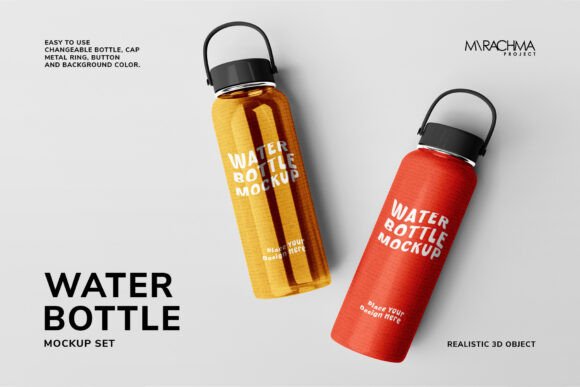
The primary value of a dedicated mockup set lies in its ability to simulate real-world conditions. This particular set features five different PSD files, each offering a unique perspective of a realistic 3D water bottle. The high resolution of 5000x3750 pixels at 300 dpi ensures that every detail, from the texture of the bottle to the reflection on the cap, is crisp and clear. This level of detail is crucial for professional presentations, whether you're pitching to a client or showcasing a new product on your e-commerce site.
What truly sets this tool apart is its deep customization. The mockup is easy to use, primarily because it leverages Photoshop Smart Objects. You can simply add your own design—be it a logo, pattern, or full-wrap artwork—directly into the designated layer in the layers palette. But the control goes far beyond just the artwork. The color of virtually every component can be adjusted to match your brand's specific palette. This includes the bottle body, the cap, the metal ring, the button, the holder, and even the background. This granular control allows you to create a cohesive scene that tells your brand's story perfectly.
Practical Applications Across Marketing and Design Projects
The versatility of a comprehensive mockup set like this one makes it useful for a wide array of projects. For a graphic designer, it's a powerful tool for packaging design presentations. Instead of describing a concept, you can show a client a photorealistic rendering of their product, which can significantly speed up the approval process and build excitement.
For small business owners and entrepreneurs, the applications are equally valuable. Here are a few practical ways to use it:
- Brand Identity & Logo Design: Test how your logo sits on a curved surface. See if the typography remains readable and if the colors pop against the bottle's material. It's a critical step in ensuring your brand mark is versatile and effective.
- Social Media Graphics & Website Content: Create eye-catching product shots for Instagram, Facebook, or your online store. A well-styled mockup image can drive engagement and help potential customers visualize owning the product.
- Marketing Collateral: Use the rendered images in brochures, digital ads, or email marketing campaigns. Professional product visuals lend credibility and can increase conversion rates.
- Merchandise & Promotional Material: If you're planning to sell branded bottles or use them as giveaways, mockups are perfect for creating pre-launch hype or catalog imagery.
Even for content creators and bloggers, this asset can be useful. For instance, a fitness blogger could use a customized bottle image as part of a branded "workout essentials" graphic, adding a professional touch to their content.
Streamlining Your Workflow for Maximum Efficiency
One of the biggest challenges in design is time management. This Water Bottle Mockup Set is designed with efficiency in mind. Since the files work in Photoshop (CS6 and above), a tool most creatives already use, there's no need to learn new software. The inclusion of a PDF help file ensures that even those less familiar with smart objects can get started quickly.
The ability to apply solid colors to different parts of the bottle via simple color pickers is a major time-saver. You can experiment with dozens of color combinations in minutes, testing what works best for your visual presentation. This rapid prototyping capability allows for more creative exploration and better final results. Instead of being locked into a single pre-colored bottle, you have the freedom to tailor every element to your exact needs, ensuring visual consistency across all your design assets.
Making Informed Choices for Professional Presentation
While the tool itself is straightforward, a few best practices can help you get the most out of it. First, consider the context of your final presentation. A mockup for a client pitch might be styled differently than one for a social media ad. Use the background color change feature to create a clean, studio-like look or to place the bottle in a more thematic setting by using a custom background layer.
Pay attention to the interplay of colors. A bright, vibrant bottle cap might draw attention to a key feature, while a subtle, matching metal ring can add a touch of sophistication. These details contribute to a professional presentation that feels intentional and polished. Always review your design on the mockup at full resolution to check for any issues with legibility or alignment that might not be apparent at a smaller size.
Finally, remember that the fonts and images shown in any preview are for display only. The true power of this set is its role as a neutral canvas for your creative work. It’s a foundational design asset that helps you communicate your vision more effectively, build stronger brand recognition through consistent visual language, and ultimately, engage your audience with a professional and tangible representation of your product. By integrating a tool like this into your process, you elevate the quality of your deliverables and save valuable time in the creative workflow.