Creative Invoice Template: A Complete Design Solution
Let's be honest—nobody gets excited about invoicing. It's the administrative chore that follows the creative high of finishing a project. But what if the document that requests payment could actually reinforce the professionalism and brand identity you worked so hard to build? A generic, text-heavy invoice can feel disconnected from the high-quality work you deliver. A thoughtfully designed template, however, bridges that gap, turning a routine transaction into a final touchpoint that leaves a lasting, positive impression.
Beyond the Basic Bill: The Anatomy of a Professional Template
A truly effective invoice does more than list hours and totals. It communicates clarity, organization, and attention to detail—qualities every client appreciates. The right template provides a structured, visually coherent layout that guides the client's eye effortlessly from the project summary to the final amount due. This isn't just about aesthetics; it's about reducing friction and questions, which can lead to faster payments. When your invoice looks as polished as your design work or business proposal, it subconsciously signals that your entire operation is run with the same standard of care.
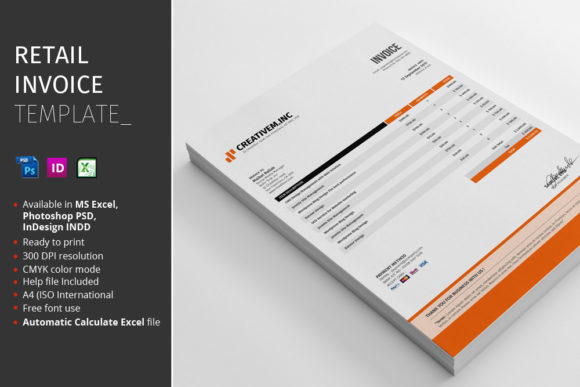
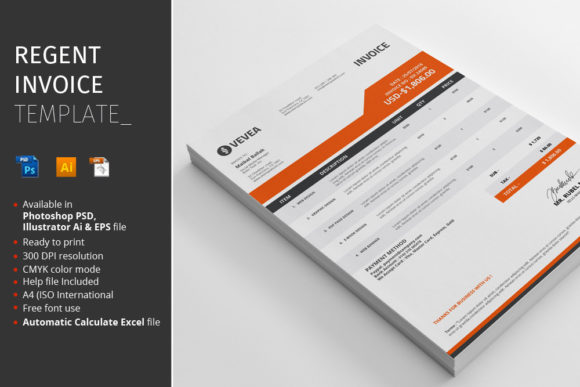
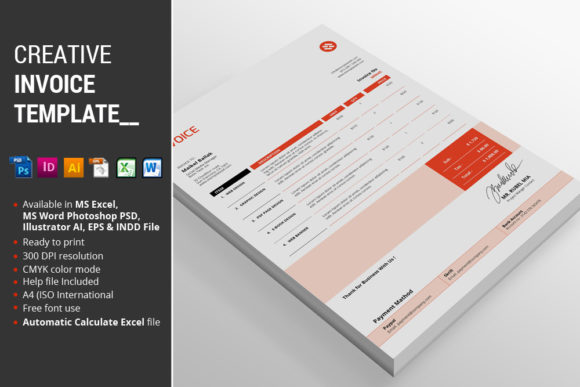
This particular Creative Invoice Template package is built for practicality and cross-software flexibility. Understanding what's included is key to integrating it smoothly into your existing workflow, whether you're a designer using the Adobe Creative Suite, a business owner comfortable with Microsoft Office, or someone who needs a simple, editable file.
What's Inside the Digital Package?
The value of a design asset lies in its usability. This package delivers the template in multiple industry-standard formats to ensure you can edit and use it without needing to purchase new software. Here’s exactly what you receive:
- 1 MS Excel 2010 file: Perfect for those who need automatic calculations for totals, taxes, and discounts. The formulas are pre-built, saving you time and minimizing math errors.
- 1 MS Word 2010 file: A familiar and straightforward option for quick text edits and printing if you don't require the advanced calculation features.
- 1 Photoshop PSD file: Ideal for designers who want full control over every visual element. Every layer is organized and labeled for easy customization of colors, fonts, and graphics.
- 1 InDesign CS5 file: The professional choice for creating print-ready documents with precise typographic control and layout management.
- 1 Illustrator file: Offers vector-based editing, making it perfect for scaling elements or integrating vector graphics from your other brand assets.
- 1 EPS file: A universal vector format that ensures compatibility with a wide range of graphic design software.
- Instructions PDF: A crucial guide that details how to edit the files, where to find the recommended fonts, and tips for customization.
Designed for Efficiency and Brand Cohesion
The template isn't just about having files; it's about having the right features built in. The Automatic Calculate function in the Excel file is a game-changer for accuracy and speed. You simply input your line items, and the totals update instantly. This eliminates a common source of error and mental load.
Visually, the template is presented in a bold Red colorway, offering a strong starting point that can be easily adapted to any brand palette. It's formatted for A4 (ISO International) size, the standard for most of the world, ensuring it prints correctly without adjustment. For those concerned about color accuracy in professional printing, the CMYK Color mode files are ready for press, while the Fully Organized layers in the design files (PSD, AI, INDD) make customization intuitive—you won't be hunting through a mess of unnamed layers to change a background color.
Integrating the Template Into Your Brand Ecosystem
Think of your invoice as part of your broader brand identity system. The same principles you apply to your logo design, packaging design, and social media graphics should extend to your administrative documents. Consistency in color, font, and layout across all touchpoints builds recognition and trust. A client who receives a beautifully branded proposal, followed by a matching invoice, experiences a seamless and professional journey.
This template serves as a foundational design asset. While it's an invoice at its core, its clean, modern layout can inspire the structure for other documents. Consider using the same header style for your letterheads, or the color and font choices for your marketing assets like PDF guides or digital product covers. This creates a cohesive visual language that strengthens your brand recognition without requiring you to design every single document from scratch.
Making It Uniquely Yours: Practical Customization Tips
The provided files are a starting point. To make the template truly yours, you'll want to customize it. The Instructions PDF is your first stop—it will specify the premium fonts used and provide direct download links. Swapping the fonts is one of the quickest ways to change the template's personality. A sans serif font will give it a clean, modern feel, while a subtle serif font might add a touch of traditional elegance.
When editing, focus on readability. Your client needs to understand the invoice quickly. Ensure there is enough contrast between text and background, and maintain a clear visual hierarchy so the most important information—like the total due and payment terms—stands out. The organized layers in the Photoshop PSD and Illustrator files make this adjustment simple; you can isolate and modify text blocks, color bars, and logo placeholders independently.
Finally, remember that this is a commercial font and template package. The licensing typically allows you to use the final, customized invoice for client projects and business purposes. However, you cannot redistribute the original, editable source files. This is standard for design assets and protects the work of the original creator while giving you the freedom to use the template commercially in your own work.
By starting with a robust, well-structured template like this one, you save countless hours of layout and formatting time. More importantly, you elevate a mundane business requirement into an opportunity to reinforce your brand's quality and professionalism. It’s a small detail that contributes significantly to the overall perception of your business or creative practice.